BIBC2025 workshop - Image segmentation
RSFAS, ANU
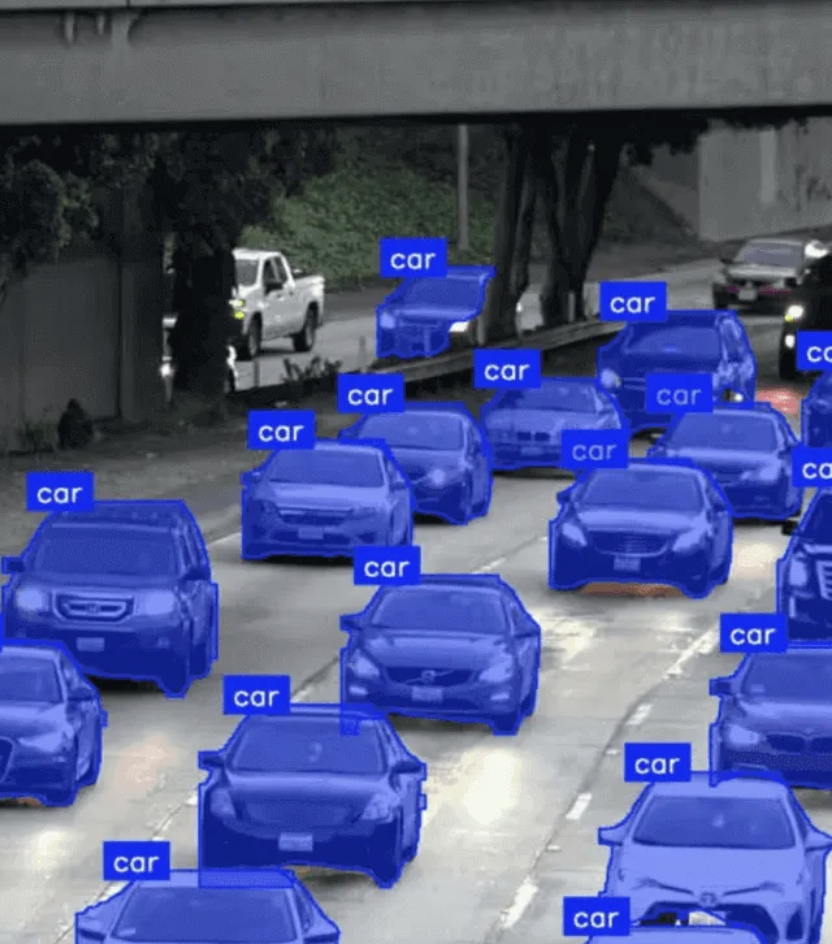
reticulate basicsImage segmentation is the process of dividing an image into coherent regions so that pixels belonging to the same object or area are grouped together.
Where do we need segmentation?

Semantic segmentation: Label each pixel with a class (no instance separation).
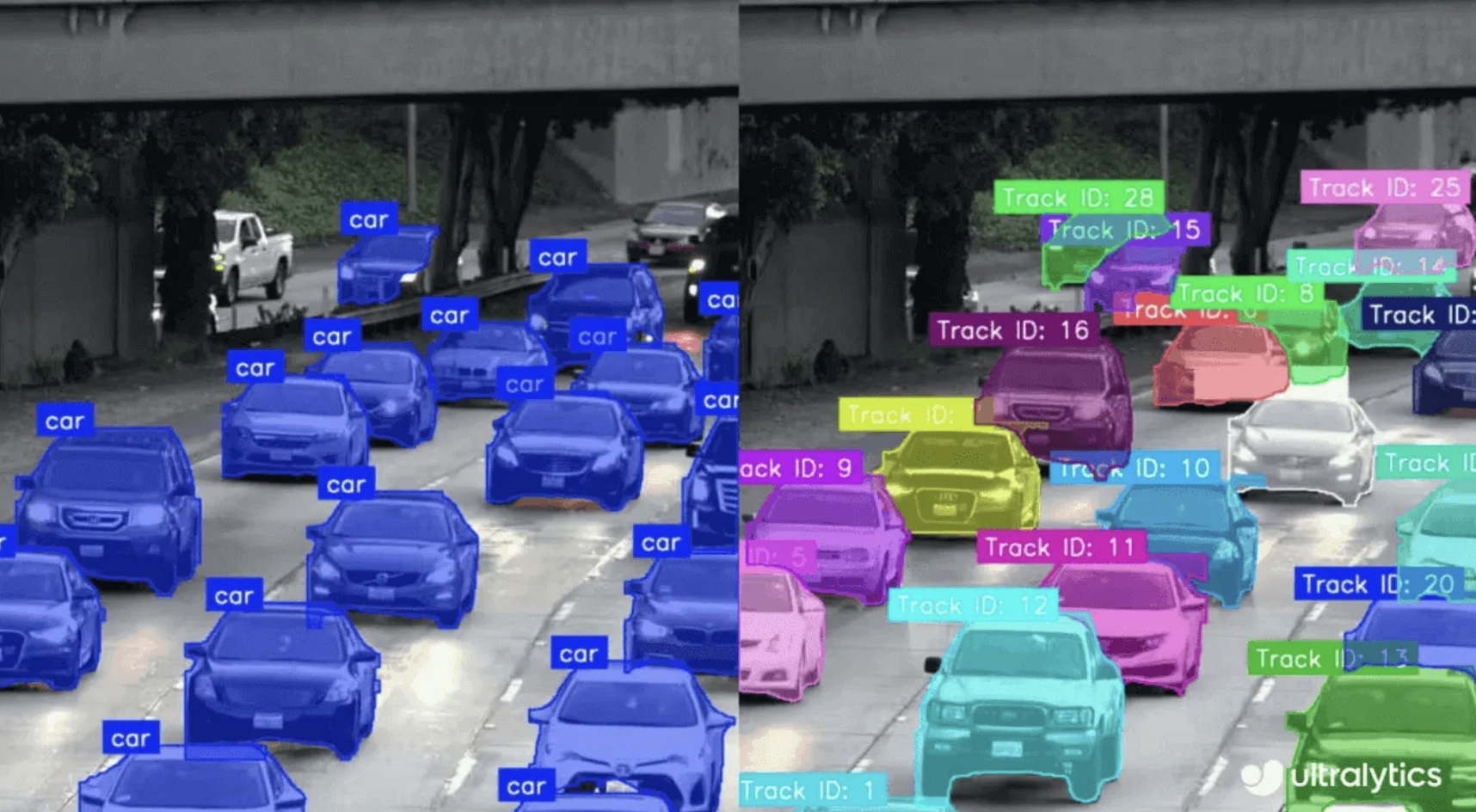
Instance segmentation: Distinguish individual objects of the same class.
Panoptic segmentation: Combines semantic + instance into one unified output.
(H, W) or (H, W, 1) a single channel per pixel0 (background), 1 (foreground)1, 2, … (class id)Masks are commonly saved as greyscale PNG or TIFF on disk.
<image_id>.txt:
annotation.json:
images: list of images
id: unique image IDfile_name: image filenameheight, width: image sizeannotations: list of objects
image_id: links annotation to imagecategory_id: class of objectbbox: [x, y, width, height] (for object detection)segmentation: polygon coordinates [[x1,y1, x2,y2, ...]] or run-length encoding for dense masks (object mask)categories: list of classes
id: class IDname: class nameThe default COCO dataset includes segmentation annotations. If your custom dataset in COCO format also contains segmentation information, you can convert it to YOLO format for segmentation tasks.
Similarly, mask data can be converted into YOLO format.

LabelMe: Web-based tool for creating polygonal and freehand annotations. Supports exporting to multiple formats like JSON for machine learning pipelines.
CVAT (Computer Vision Annotation Tool): Powerful open-source platform for image and video annotation. Supports polygons, masks, and tracking for object detection and segmentation.

VIA (VGG Image Annotator): Lightweight, browser-based tool. Ideal for quick annotations with minimal setup. Exports annotations in JSON or CSV.
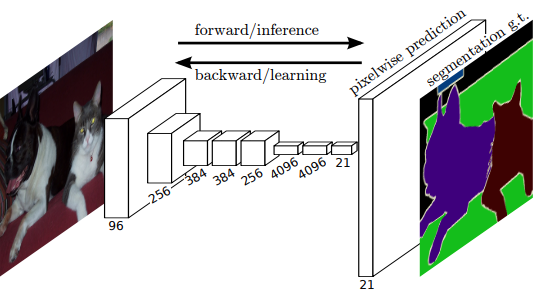
Fully convolutional networks (FCNs) were introduced by Jonathan Long, Evan Shelhamer, and Trevor Darrell at UC Berkeley as the first deep learning model designed specifically for image segmentation.
FCNs are a great starting point: understanding how they transform and upsample feature maps to make dense predictions provides insight into the mechanisms used in many modern image generation models.
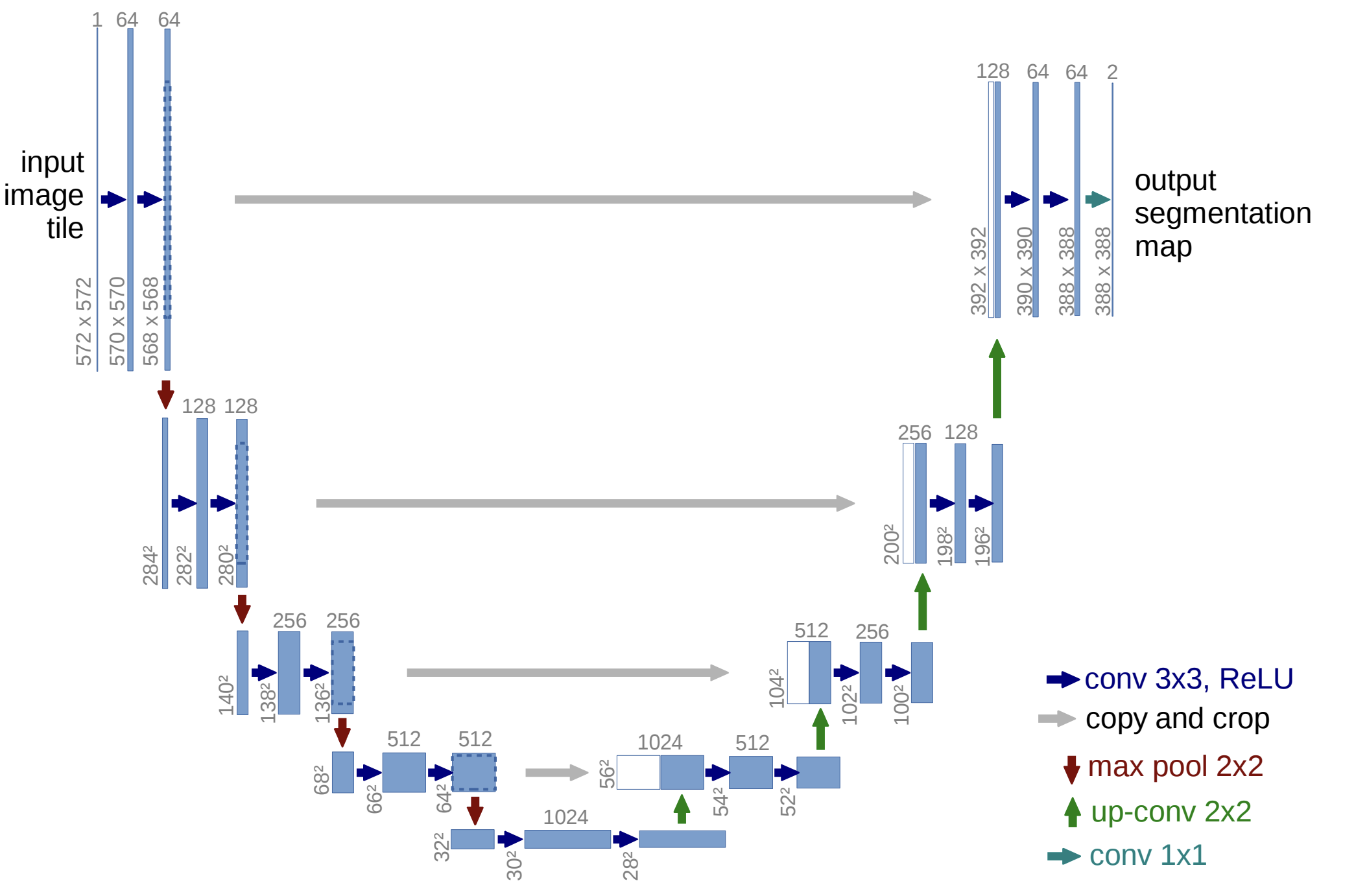
The U-Net family consists of encoder–decoder architectures with skip connections that preserve spatial detail, making them highly effective for dense prediction tasks in medical imaging, remote sensing, and agriculture.
Conv2DTranspose layerPyTorch Model in KerasMany models are implemented in PyTorch and available on PyTorch Hub. If you want to use them within Keras and leverage the Keras API (e.g., model$fit), you can wrap the PyTorch model inside a Keras Model subclass.
UNET <- py_class("UNET", inherit = keras$Model,
`__init__` = function(self) {
py_super_init()
self$torch_model <- torch$hub$load('mateuszbuda/brain-segmentation-pytorch',
'unet',
in_channels = 3L,
out_channels = 1L,
init_features = 32L,
pretrained = TRUE)
return(py_none())
},
call = function(self, inputs) {
self$torch_model(inputs)
})
unet <- UNET()
unet$build(input_shape = tuple(3L, 224L, 224L))
unet$predict(torch$rand(1L, 3L, 224L, 224L), verbose = 0L)
torchinfo <- import("torchinfo", convert = FALSE)
torchinfo$summary(unet$torch_model, verbose = 0L)array([[[[ 0.00016492, 0.00031365, 0.0083269, ..., 6.8472e-06, 4.3041e-06, 5.7438e-06],
[ 0.0016305, 0.59742, 0.96157, ..., 8.1315e-06, 4.0497e-06, 9.3273e-06],
[ 0.0037927, 0.96401, 0.99463, ..., 3.4032e-05, 4.3878e-06, 5.098e-06],
...,
[ 2.479e-06, 4.9183e-06, 3.9021e-06, ..., 6.89e-06, 5.2762e-06, 2.6929e-06],
[ 5.6125e-06, 5.2292e-06, 6.2167e-06, ..., 1.5316e-05, 4.2913e-06, 1.084e-05],
[ 8.6902e-06, 7.2598e-06, 5.7763e-06, ..., 8.7257e-06, 5.874e-06, 3.8367e-06]]]], shape=(1, 1, 224, 224), dtype=float32)
=================================================================
Layer (type:depth-idx) Param #
=================================================================
TorchModuleWrapper --
├─UNet: 1-1 --
│ └─Sequential: 2-1 --
│ │ └─Conv2d: 3-1 864
│ │ └─BatchNorm2d: 3-2 64
│ │ └─ReLU: 3-3 --
│ │ └─Conv2d: 3-4 9,216
│ │ └─BatchNorm2d: 3-5 64
│ │ └─ReLU: 3-6 --
│ └─MaxPool2d: 2-2 --
│ └─Sequential: 2-3 --
│ │ └─Conv2d: 3-7 18,432
│ │ └─BatchNorm2d: 3-8 128
│ │ └─ReLU: 3-9 --
│ │ └─Conv2d: 3-10 36,864
│ │ └─BatchNorm2d: 3-11 128
│ │ └─ReLU: 3-12 --
│ └─MaxPool2d: 2-4 --
│ └─Sequential: 2-5 --
│ │ └─Conv2d: 3-13 73,728
│ │ └─BatchNorm2d: 3-14 256
│ │ └─ReLU: 3-15 --
│ │ └─Conv2d: 3-16 147,456
│ │ └─BatchNorm2d: 3-17 256
│ │ └─ReLU: 3-18 --
│ └─MaxPool2d: 2-6 --
│ └─Sequential: 2-7 --
│ │ └─Conv2d: 3-19 294,912
│ │ └─BatchNorm2d: 3-20 512
│ │ └─ReLU: 3-21 --
│ │ └─Conv2d: 3-22 589,824
│ │ └─BatchNorm2d: 3-23 512
│ │ └─ReLU: 3-24 --
│ └─MaxPool2d: 2-8 --
│ └─Sequential: 2-9 --
│ │ └─Conv2d: 3-25 1,179,648
│ │ └─BatchNorm2d: 3-26 1,024
│ │ └─ReLU: 3-27 --
│ │ └─Conv2d: 3-28 2,359,296
│ │ └─BatchNorm2d: 3-29 1,024
│ │ └─ReLU: 3-30 --
│ └─ConvTranspose2d: 2-10 524,544
│ └─Sequential: 2-11 --
│ │ └─Conv2d: 3-31 1,179,648
│ │ └─BatchNorm2d: 3-32 512
│ │ └─ReLU: 3-33 --
│ │ └─Conv2d: 3-34 589,824
│ │ └─BatchNorm2d: 3-35 512
│ │ └─ReLU: 3-36 --
│ └─ConvTranspose2d: 2-12 131,200
│ └─Sequential: 2-13 --
│ │ └─Conv2d: 3-37 294,912
│ │ └─BatchNorm2d: 3-38 256
│ │ └─ReLU: 3-39 --
│ │ └─Conv2d: 3-40 147,456
│ │ └─BatchNorm2d: 3-41 256
│ │ └─ReLU: 3-42 --
│ └─ConvTranspose2d: 2-14 32,832
│ └─Sequential: 2-15 --
│ │ └─Conv2d: 3-43 73,728
│ │ └─BatchNorm2d: 3-44 128
│ │ └─ReLU: 3-45 --
│ │ └─Conv2d: 3-46 36,864
│ │ └─BatchNorm2d: 3-47 128
│ │ └─ReLU: 3-48 --
│ └─ConvTranspose2d: 2-16 8,224
│ └─Sequential: 2-17 --
│ │ └─Conv2d: 3-49 18,432
│ │ └─BatchNorm2d: 3-50 64
│ │ └─ReLU: 3-51 --
│ │ └─Conv2d: 3-52 9,216
│ │ └─BatchNorm2d: 3-53 64
│ │ └─ReLU: 3-54 --
│ └─Conv2d: 2-18 33
├─ParameterDict: 1-2 7,763,041
=================================================================
Total params: 15,526,082
Trainable params: 15,526,082
Non-trainable params: 0
=================================================================
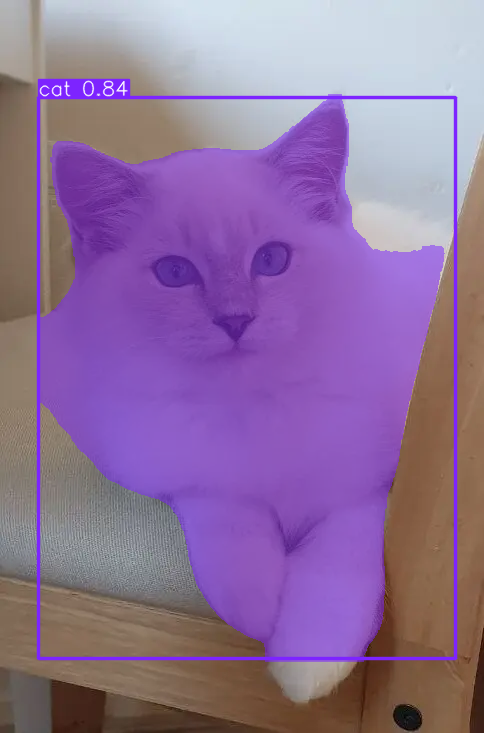
YOLO <- ultralytics$YOLO
model <- YOLO("yolov8n-seg.pt")
result <- model$predict("slide_figures/original.png")
image 1/1 /Users/patrickli/Desktop/rproj/ibsar-cv-workshop/instructor/slides/slide_figures/original.png: 640x448 1 cat, 45.2ms
Speed: 1.5ms preprocess, 45.2ms inference, 1.1ms postprocess per image at shape (1, 3, 640, 448)
'slide_figures/cat_segmentation.png'
Training a segmentation model in YOLO is very straightforward, and the data format is largely the same as for object detection.
Computer vision is a vast field, and this workshop has focused on classification, and briefly touch on detection, and segmentation.
If you’d like to explore further, here are some important directions:

Slides URL: https://ibsar-cv-workshop.patrickli.org/ | Canberra time